There might be a time when the default shipped languages aren’t enough and you need to add additional language support – in my case Italian. Here’s how.
Change to the custom themes directory
cd /var/netscaler/logon/themes/Italian-Test/
Create a copy of the custom strings .js and .json file. Those aren’t really necessary but help to prevent overrides from the default English custom strings that otherwise would appear.
cp strings.en.js strings.it.js
cp strings.en.json strings.it.json
Now create a copy of the actual language file
cp ../../LogonPoint/receiver/js/localization/en/ctxs.strings.js ctxs.strings.it.js
Within this ctxs.strings.it.js file you can now perform your translations. Most basic variables for the login mask start with nsg_
root@ns-lab# cat ctxs.strings.it.js | grep nsg_
"nsg_username":"Nome utente",
"nsg_password1":"Parola d'ordine",
"nsg_password2":"Token",
"nsg_LogOnbutton":"Log On",
"nsg_loginHeading":"Si prega di accedere",
"nsg_GoBack":"Go Back",
"nsg_oldpass": "Old Password :",
"nsg_newpass": "New Password :",
"nsg_confirmpass": "Confirm Password :",
"nsg_changepass": "Change Password",
root@ns-lab#
Up until this point – nothing will happen.
What we finally need to do is to introduce the new files as a new “culture”. This happens in the script.js file
(function ($) {
$.globalization.availableCulture("it", {
name: "it",
englishName: "Italian",
nativeName: "Italiano",
stringBundle: "custom/ctxs.strings.it.js",
customStringBundle: "custom/strings.it.js"
});
})(jQuery);
And there you go…
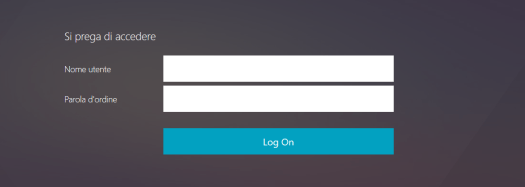
*my Italian visitors please excuse the (potentially) horrible Google Translator sample!
 NerdScaler
Dear Manuel, thank you for your article.
I did it for Netscaler 14.1 and I couldn’t add a new language. Are there any changes?
Best regards, Petro
LikeLike
Hi Petro, I’m a bit out of the Netscaler game at the moment so didn’t catch up with 14.1 in detail. So not sure to be honest.
LikeLike